

Overview
All Merit Palk API requests require authentication using HMAC-SHA256 signatures. This ensures message integrity and authenticates requests to specific companies.
Prerequisites
- Merit Palk PRO license
- API credentials (API ID and API Key) generated from Merit Palk Settings > API Settings.
Credentials
| Credential | Format | Description |
|---|---|---|
| API ID | GUID | Unique identifier for your API access |
| API Key | Base64 string (256-bit) | Secret key for signature calculation |
Admin users can generate and manage API credentials in Merit Palk Settings > API Settings.
- Navigate to API Settings
- Click “New API key” to create new credentials
- Store the API Key securely – it cannot be retrieved after creation
- Add optional comments to identify the credential purpose
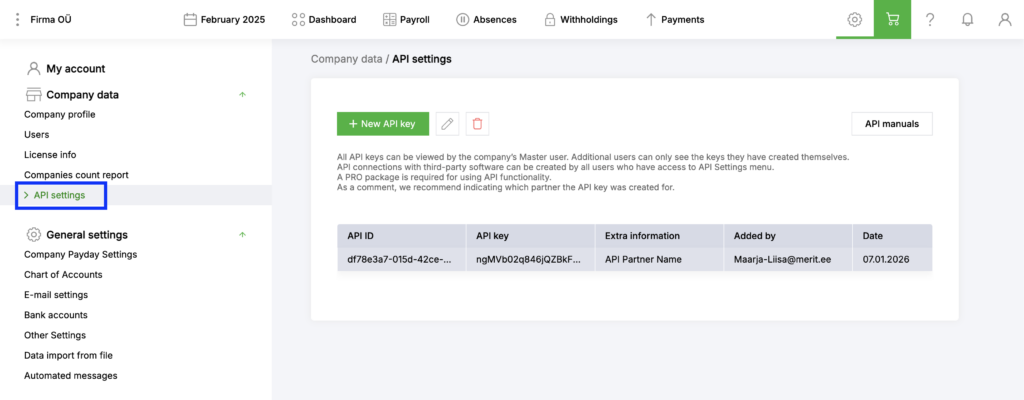
Keep your Api ID and Api Key secret. They should be guarded just as you would your regular account password. If you feel your ID and Key has been compromised, you can reset it by deleting and re creating a new ID and Key.
Request Authentication
Required Query Parameters
All API endpoints require these query string parameters:
| Parameter | Format | Description |
|---|---|---|
| apiId | GUID | Your API ID credential |
| timestamp | yyyyMMddHHmmss | Current UTC time |
| signature | Base64 string (URL-encoded) | HMAC-SHA256 signature |
Timestamp Requirements
- Format: yyyyMMddHHmmss (numeric, 14 digits)
- Timezone: Must be UTC
- Validity: Use current time – requests with old or future timestamps are rejected
Signature Calculation
The signature is calculated using HMAC-SHA256 (RFC-2104):
dataToSign = UTF8_bytes(ApiId + Timestamp + RequestBody)
hmacKey := ascii_to_bytes(ApiKey)
signatureBytes := hmac_sha256(hmacKey, dataToSign)
signature := base64(signatureBytes)Important: The signature must be URL-encoded when passed as a query parameter.
The + character in Base64 must be encoded as %2B.
Example Request
POST
/api/v1/getemployees?apiId=670fe52f-558a-4be8-ade0-526e01a106d0×tamp=20240624205902&signature=dt6dkfuj%2BOfX01YkvvAoN%2FfekAUGr6AvVlQhUUja9Qc%3D
Content-Type: application/json
{"OnlyActive": true}Request Format
| Aspect | Requirement |
|---|---|
| Method | HTTP POST (for most endpoints) |
| Content-Type | application/json |
| Encoding | UTF-8 |
| Date format | yyyy-mm-dd |
| Decimal separator | . (dot) |
| Boolean values | true / false (lowercase) |
| Null values | null (lowercase) |
| Percentages | Whole numbers (5 for 5%, not 0.05) |
Response Codes
| Code | Description |
|---|---|
| 200 | Success – response contains requested data |
| 400 | Bad Request – invalid request data or business rule violation |
| 401 | Unauthorized – invalid credentials, signature, or missing PRO license |
Code Examples
C#
public string CalculateSignature(string apiId, string apiKey, string timestamp, string requestBody)
{
byte[] keyBytes = Encoding.ASCII.GetBytes(apiKey);
byte[] dataBytes = Encoding.UTF8.GetBytes(apiId + timestamp + requestBody);
using (var hmac = new HMACSHA256(keyBytes))
{
byte[] signatureBytes = hmac.ComputeHash(dataBytes);
return Convert.ToBase64String(signatureBytes);
}
}
// Usage
string apiId = "your-api-id";
string apiKey = "your-api-key";
string timestamp = DateTime.UtcNow.ToString("yyyyMMddHHmmss");
string requestBody = "{\"OnlyActive\":true}";
string signature = CalculateSignature(apiId, apiKey, timestamp, requestBody);
string signatureEncoded = WebUtility.UrlEncode(signature);
string url = $"https://palk.merit.ee/api/v1/getemployees?apiId={apiId}×tamp={timestamp}&signature={signatureEncoded}";Python
import hmac
import hashlib
import base64
from datetime import datetime
from urllib.parse import quote
def calculate_signature(api_id: str, api_key: str, timestamp: str, request_body: str) -> str:
key_bytes = api_key.encode('ascii')
data_to_sign = (api_id + timestamp + request_body).encode('utf-8')
signature = hmac.new(key_bytes, data_to_sign, hashlib.sha256).digest()
return base64.b64encode(signature).decode('utf-8')
# Usage
api_id = "your-api-id"
api_key = "your-api-key"
timestamp = datetime.utcnow().strftime("%Y%m%d%H%M%S")
request_body = '{"OnlyActive":true}'
signature = calculate_signature(api_id, api_key, timestamp, request_body)
signature_encoded = quote(signature, safe='')
url = f"https://palk.merit.ee/api/v1/getemployees?apiId={api_id}×tamp={timestamp}&signature={signature_encoded}"
Security Best Practices
- Protect your API Key – treat it like a password
- Use HTTPS – all communication is encrypted
- Regenerate credentials if compromised – delete and create new ones in API Settings
- Limit credential sharing – create separate credentials for different integrations
Troubleshooting
| Error | Cause | Solution |
|---|---|---|
| Missing URL parameter | apiId, timestamp, or signature not provided | Ensure all three parameters are in the query string |
| Timestamp not valid | Timestamp too old or in future | Use current UTC time in yyyyMMddHHmmss format |
| Unauthorized | Invalid API ID | Verify API ID in Settings > API Settings |
| Incorrect signature | Signature calculation error | Verify: correct API Key, UTF-8 encoding, exact concatenation order (ApiId + Timestamp + Body) |
| PRO licence needed | No active PRO license | Upgrade to Merit Palk PRO package |